DU SOL Fee Payment 2026: How to Pay Fees Online Step-by-Step Guide
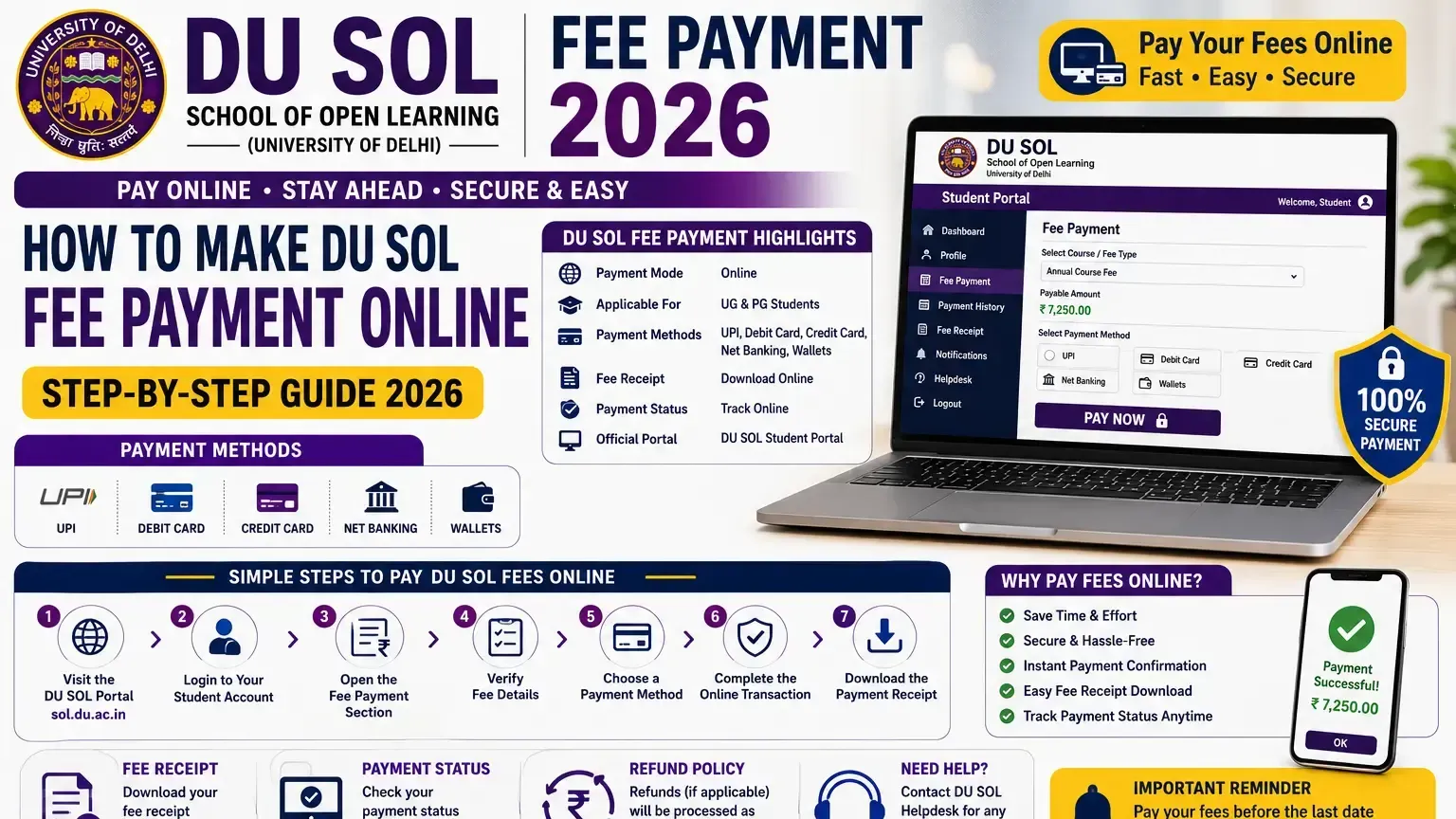
Online fee payment for DU SOL all UG/PG students is completed via the website of the student at sol.du.ac.in and includes payment of the admission fee, annual fees of the courses, exam fee and the re-registration fee of the same. Making the payment of the DU SOL fee before the set dates is essential for the generation of the examination form and the hall ticket. This page has details of the DU SOL Fee Payment Online procedure, payment options accepted, receipt downloading, status checking, fee refund policy and payment problem solving for DU SOL Fees 2026.
DU SOL Fee Payment 2026 – Overview
What is DU SOL Fee Payment?
DU SOL Fee Payment is an online process to pay all required student charges, which are admission fees, course fees, exam fees, and re-admission fees, from the official website.
Who Needs to Pay the Fee?
All enrolled Delhi University School of Open Learning UG and PG candidates are mandated to pay DU SOL fee online and on time for the successful continuation of their studies.
Types of Fees Collected by DU SOL
Admission fee, annual course fee, examination fee, re-registration fee, late fee where applicable, and miscellaneous charges constitute the complete DU SOL fee payment obligations.
Benefits of Online Fee Payment
The online fee payment through DU SOL requires no queuing, provides instant digital receipts, and offers the facility to process transactions at any time. DU SOL online fee payment also has a trackable payment history.
DU SOL Fee Payment Highlights
Particular | Details |
University | Delhi University School of Open Learning |
Payment Mode | Online Only |
Applicable For | UG and PG Students |
Payment Methods | UPI, Debit Card, Credit Card, Net Banking |
Fee Receipt | Available Online — Downloadable PDF |
Payment Status | Trackable Through Student Dashboard |
Official Portal | sol.du.ac.in |
Types of DU SOL Fees
Admission Fee
Admission Online Registration: One-time fee paid at the time of initial enrollment — included in the first-year DU SOL fee payment and not charged in subsequent academic years.
Annual Course Fee
Primary academic charge paid annually — covers tuition, study material, student welfare, and university development components of DU SOL fee payment.
Examination Fee
Semester-wise fee covering examination paper setting, evaluation, and result processing — payable as part of the DU SOL online fee payment cycle each semester.
Re-registration Fee
Annual re-registration charge for continuing students — mandatory each academic year to maintain active enrollment through DU SOL fee payment.
Late Fee (If Applicable)
Additional penalty charge applied to DU SOL fee payment submitted after the published deadline — amount varies by category and duration of delay.
Miscellaneous Charges
Identity card, prospectus, migration certificate, and duplicate document charges — payable through the standard DU SOL fee payment portal as required.
Fee Type | Purpose |
Admission Fee | One-time enrollment charge |
Annual Course Fee | Tuition and academic services |
Examination Fee | Exam processing per semester |
Re-registration Fee | Annual enrollment continuation |
Late Fee | Penalty for delayed payment |
Miscellaneous | Documents and administrative charges |
How to Make DU SOL Fee Payment Online?
Step 1: Visit the Official DU SOL Portal
In order to access sol.du.ac.in for DU SOL Online Payments, you must have Chrome and Firefox browsers installed. These are valid browsers in which you can access DU SOL Online Payments.
Step 2: Login to Your Student Account
Enter enrollment number and registered password — credentials are mandatory before accessing the DU SOL online fee payment section.
Step 3: Open the Fee Payment Section
Go to Fee payment from the student dashboard - showing all your due and submitted fee payments of DU SOL.
Step 4: Verify Fee Details
DU SOL Fee payment: Make sure to check review amount of fees, type of fee and year of education, there is no mistake in these figures before going for the DU SOL fee payment.
Step 5: Choose a Payment Method
Select preferred payment method — UPI, debit card, credit card, or net banking — from the available options on the DU SOL fee payment gateway.
Step 6: Complete the Online Transaction
Enter payment credentials and complete the transaction — maintain stable internet connectivity throughout the DU SOL online fee payment process to avoid transaction failures.
Step 7: Download the Payment Receipt
Download the DU SOL fee receipt PDF immediately after successful transaction — save to device storage and cloud backup before closing the payment confirmation page.
DU SOL Online Fee Payment Methods
UPI Payment
Google Pay, PhonePe, Paytm, and BHIM UPI — fastest and most widely used method for DU SOL fee payment online with instant confirmation.
Debit Card
All major debit card such as VISA, Mastercard, Rupay accepted on DU SOL online fee payment gateway without processing fee charges on such transactions.
Credit Card
Visa and Mastercard credit cards accepted for DU SOL fee payment — no surcharge applied for credit card transactions on the official portal.
Net Banking
All major bank net banking accounts — SBI, HDFC, ICICI, Axis, PNB, Canara, and 50+ others — integrated with the DU SOL fee payment gateway.
Digital Wallets (If Available)
Select digital wallet options may be available on the DU SOL online fee payment portal — verify current wallet acceptance on sol.du.ac.in before initiating payment.
How to Download the DU SOL Fee Receipt?
Login to Student Portal
Access sol.du.ac.in and login with enrollment number and password — DU SOL fee receipt is accessible through the authenticated student dashboard.
Open Payment History
Navigate to Fee Payment History section — displays all completed DU SOL fee payment transactions with dates, amounts, and transaction reference numbers.
Download Receipt PDF
DU SOL Fee Receipt You'd find the Download Receipt option under the corresponding transaction. Click on that to generate DU SOL fee receipt in the PDF format with all the payment information.
Print the Receipt
Print minimum two physical copies of the DU SOL fee receipt — required for admission confirmation, document verification, and future fee dispute resolution.
How to Check DU SOL Fee Payment Status?
Student Dashboard
Log in to sol.du.ac.in and navigate to the Fee section — current DU SOL fee payment status for all applicable charges is displayed on the dashboard.
Payment Confirmation
Successful DU SOL online fee payment generates an instant confirmation message on screen alongside an automatically issued transaction reference number.
Transaction History
Complete DU SOL fee payment history including dates, amounts, transaction IDs, and payment methods is accessible through the Payment History section.
Receipt Verification
Verify DU SOL fee receipt authenticity by cross-checking transaction reference number against the payment confirmation email received at the registered email address.
DU SOL Fee Structure 2026
UG Course Fees
Annual DU SOL fee payment for UG programs ranges from Rs 2,500 to Rs 6,000 depending on the course, BA fees and BCom at the lower end, BBA at the higher end.
PG Course Fees
Annual DU SOL online fee payment for PG programs ranges from Rs 3,000 to Rs 10,000 per year — MA and M.Com at the lower range, MBA and MCA higher.
Course-wise Fee Comparison
Course | Annual Fee (Approx.) |
BA Programme | Rs 2,500 – Rs 3,500 |
BCom Programme | Rs 2,500 – Rs 3,500 |
BBA | Rs 4,000 – Rs 6,000 |
MA | Rs 3,000 – Rs 5,000 |
M.Com | Rs 3,000 – Rs 5,000 |
MBA | Rs 5,000 – Rs 10,000 |
Additional Charges
Examination fee, re-registration fee, and miscellaneous charges are billed separately — add Rs 1,000 to Rs 3,000 annually to the base DU SOL fee payment amount.
Common DU SOL Fee Payment Issues
Payment Failed but Amount Debited
Amount deducted from account without DU SOL fee receipt generation — wait 24 to 48 hours for automatic reversal before contacting DU SOL helpdesk.
Fee Receipt Not Generated
DU SOL fee receipt may not generate immediately during server congestion — login after 30 minutes and check Payment History for updated confirmation status.
Payment Status Pending
Pending DU SOL online fee payment status typically resolves within 24 to 48 hours — contact bank if pending status persists beyond 48 hours without resolution.
Duplicate Payment
Accidental double payment during DU SOL fee payment processing — raise a refund request through the official portal with both transaction reference numbers.
Login Problems During Payment
Portal session timeout during DU SOL fee payment — re-login and navigate back to the fee section before initiating a fresh payment attempt.
Solutions for DU SOL Payment Problems
Check Transaction Status
Login to sol.du.ac.in and navigate to Payment History — most DU SOL fee payment issues are resolved automatically within 24 to 48 hours without manual intervention.
Contact DU SOL Helpdesk
Reach DU SOL support through sol.du.ac.in official helpdesk — provide enrollment number, transaction reference, amount, and DU SOL online fee payment issue description.
Raise an Online Ticket
Submit a support ticket through the official portal — attach DU SOL fee receipt or transaction screenshot as supporting evidence for payment dispute resolution.
Bank Support
Contact the issuing bank if the amount is debited but DU SOL fee payment is not confirmed — banks can initiate transaction trace and refund processes independently.
Refund Request Process
Submit refund requests through sol.du.ac.in with transaction reference number, enrollment details, and DU SOL fee receipt or bank statement as supporting documentation.
DU SOL Fee Refund Policy
Eligibility for Refund
DU SOL fee payment refunds are processed under UGC refund norms — eligibility depends on the date of withdrawal relative to the admission closing date.
Refund Rules
Full refund minus processing charges for withdrawal before admission closing date — UGC-prescribed deduction schedule applies for withdrawals after closing date.
Refund Timeline
Approved DU SOL online fee payment refunds are processed within 15 to 30 working days — credited to the original payment source used during transaction.
Important Guidelines
Refund requests must be submitted through sol.du.ac.in official helpdesk — offline or email-only refund requests are not accepted under current DU SOL fee payment refund policy.
DU SOL Fee Payment Deadlines
Fee Type | Expected Deadline |
Admission Fee | July – August 2026 |
Annual Course Fee | July – August 2026 |
Re-registration Fee | June – July 2026 |
Examination Fee | March – April 2026 |
Late Fee Window | Varies — check sol.du.ac.in |
Admission Fee Last Date
DU SOL fee payment for new admissions must be completed within the admission window — typically July to August 2026 for the current academic cycle.
Semester Fee Deadline
The annual Distance Education Courses Fees DU SOL online fee payment deadline falls between July and August — verify the exact date on sol.du.ac.in before the academic year commencement.
Re-registration Fee Deadline
Continuing students must complete re-registration DU SOL fee payment between June and July annually — failure causes enrollment suspension.
Examination Fee Due Date
Examination fee DU SOL fee payment must be completed before the examination form submission deadline — typically March to April for even semester examinations.
Tips for Successful DU SOL Fee Payment
Keep Login Credentials Ready
Verify enrollment number and portal password before initiating DU SOL fee payment — login failures during payment create session interruptions.
Use a Stable Internet Connection
Unstable connectivity during DU SOL online fee payment causes transaction failures and potential double debits — use WiFi or strong mobile data connections.
Verify Fee Details Before Payment
Confirm fee amount, fee type, and academic year on the payment screen before submitting DU SOL fee payment — incorrect payments require refund requests.
Save the Payment Receipt
Download and save the DU SOL fee receipt PDF immediately after transaction completion — delayed downloads may require re-login and additional verification steps.
Avoid Multiple Payment Attempts
Do not refresh or retry the DU SOL online fee payment page if the transaction appears to be processing — multiple attempts increase duplicate payment risk.
Latest Updates on DU SOL Fee Payment 2026
Revised Payment Process
DU SOL has streamlined the DU SOL fee payment interface for 2026 — improved gateway responsiveness and faster receipt generation have been implemented.
New Online Payment Features
UPI and multiple digital payment integrations have been expanded on the DU SOL online fee payment portal — providing broader payment method accessibility for students.
Fee Notification Updates
DU SOL fee payment deadline reminders are now sent to registered email and mobile numbers — students should ensure contact details are updated on the portal.
Official Announcements
All DU SOL fee payment deadline revisions, new charges, and payment process updates are published exclusively on sol.du.ac.in — monitor regularly during admission and examination seasons.
Conclusion
DU SOL fee payment is a fully online, straightforward process covering all academic charges through a secure payment gateway at sol.du.ac.in — students should complete all applicable fees within published deadlines to avoid late charges and enrollment complications. DU SOL online fee payment deadlines are enforced without extensions in most cycles — completing payment well before the due date prevents last-day portal congestion and transaction failure risks. DU SOL fee receipt is basically a payment proof against confirmation for admission, form processing fee and also dispute resolving - Keep your hard copies in at least two and soft copies as many you can throughout the year.